No Backend, No Payment Integration—Turn Webpages into Agents Instantly with iframes

Built on the mulerun-init project, Product Creative Studio generates professional, multi-scene product marketing materials with a single click. It helps users significantly reduce photography and post-production costs, dramatically boosts creative efficiency, and enables quick selection of the best visuals from various creative options.
Experience link: MuleRun
As an independent developer, I am constantly looking for ways to quickly turn ideas into cash flow. In the past, when building AI Agent projects, the biggest headache was always the tasks unrelated to the core functionality that still required massive effort: setting up backend servers, integrating payment systems, implementing metering and billing, handling user authentication… This “grunt work” often consumed 70% of the development time while contributing only 30% of the actual value.
Everything changed when I discovered the MuleRun platform and its iframe Agent specification. Using this solution, I transformed a pure frontend page into a sellable AI Agent in just one day, completely skipping traditional hurdles like backend development and payment integration. More importantly, my monetization efficiency tripled—the path from idea to revenue was drastically shortened.
Today, I want to share the open-source project I developed based on the MuleRun iframe Agent specification: aichimp/mulerun-init, along with the technical concepts and practical experience behind it.
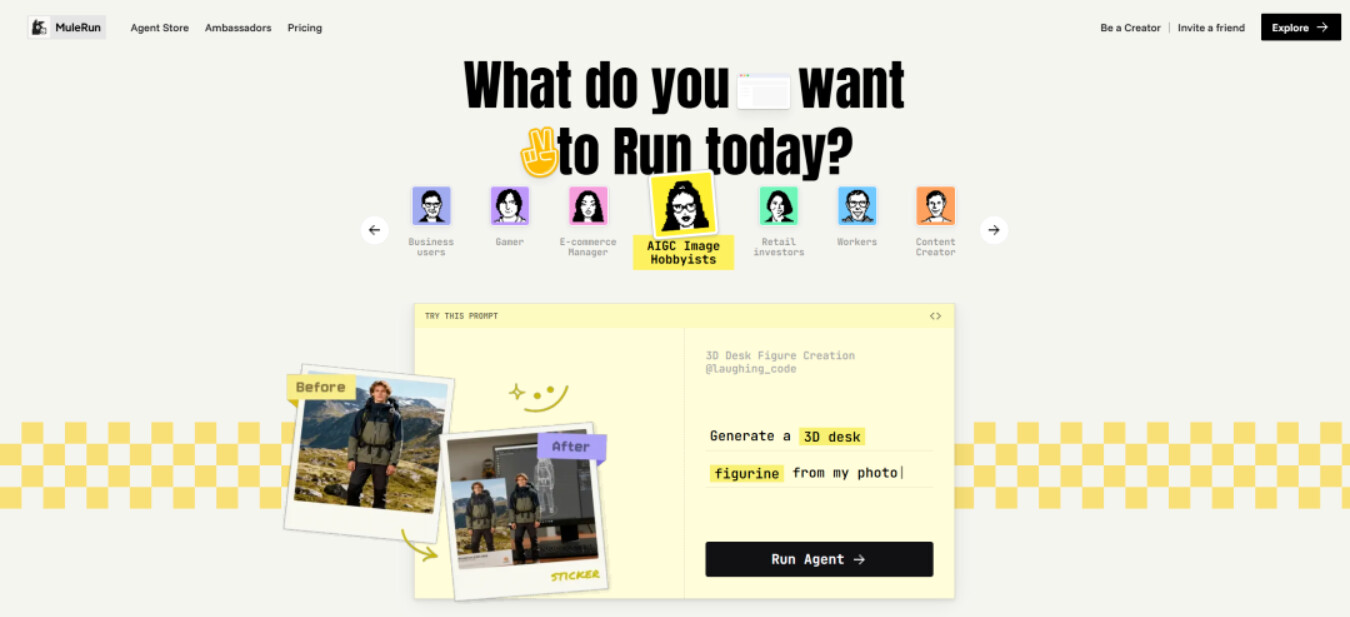
Why MuleRun? Solving the Three Big Pain Points of AI Agent Monetization
Before diving into technical details, let’s talk about why MuleRun attracted me.
Pain Point 1: High Infrastructure Costs
To build a traditional AI Agent product, you need to:
- Rent servers or buy cloud services (at least $20-50/month)
- Configure HTTPS certificates and domains
- Set up databases to store user data
- Implement load balancing and auto-scaling
This infrastructure not only costs money but, more importantly, requires continuous maintenance. A small bug could mean waking up in the middle of the night to fix the server.
Pain Point 2: Complex Payment Integration & Compliance
Integrating payment services like Stripe or PayPal requires:
- Understanding complex API documentation
- Handling various currencies and payment methods
- Implementing refunds, subscription management, etc.
- Meeting compliance requirements like PCI DSS
Worse yet, payment habits and regulatory requirements differ across countries, making globalization an almost impossible task.
Pain Point 3: Lack of User Acquisition & Distribution Channels
Even if the product is built, how do users find it? Traditional methods require:
- Ad spending (high cost, uncertain conversion)
- SEO optimization (takes time to build authority)
- Social media marketing (requires constant operation)
MuleRun provides a ready-made AI Agent marketplace with over 500,000 registered users. Your Agent can be seen by global users the moment it is listed.
MuleRun’s Latest Solution: The iframe Agent Specification
MuleRun completely won me over with its iframe Agent specification. The core philosophy is: You focus on the business logic, put the page in an iframe, and leave the rest to the platform.
What is an iframe Agent?
Simply put, an iframe Agent is a webpage running inside an iframe that interacts with the platform via the MuleRun API. The platform handles:
- Session Management: Verifying user identity and maintaining session state
- Metering & Billing: Automatically tracking usage and charging users
- Payment Processing: Handling global payments and supporting multiple currencies
- Distribution Channels: Showcasing your Agent on the MuleRun marketplace
And you only need to:
- Develop a webpage (any frontend stack works)
- Call the MuleRun API to implement AI features
- Report usage to the platform
It’s that simple.
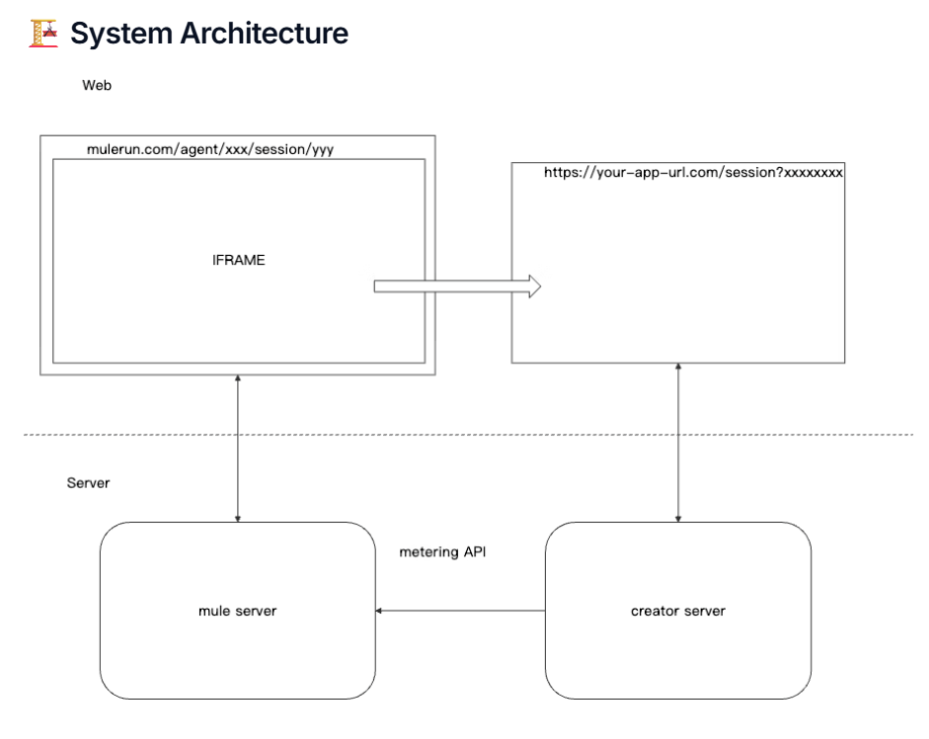
Technical Architecture: Analyzing the mulerun-init Project
Based on this philosophy, I created the aichimp/mulerun-init project, an out-of-the-box iframe Agent template containing all necessary foundational features.
Overall Architecture
The project uses a Cloudflare Pages + Functions serverless architecture:
mulerun-init/
├── apps/                    # Multiple iframe applications
│   ├── _template/          # Copyable page template
│   └── init/               # Default example page
├── functions/              # Cloudflare Pages Functions (Backend)
│   └── api/
│       ├── ai.ts           # Unified AI API proxy
│       ├── metering.ts     # Metering reporting
│       └── session.ts      # Session validation
├── src/                    # React Shell Application
│   ├── App.tsx
│   └── config.ts
└── wrangler.toml           # Cloudflare configuration
Why Cloudflare Pages?
- Truly Zero Cost: The free tier is sufficient for small-scale use.
- Global Distribution: Automatically deploys to 330+ global nodes.
- No Server Management: Fully managed with auto-scaling.
- Native TypeScript Support: Pages Functions can be written directly in TypeScript.
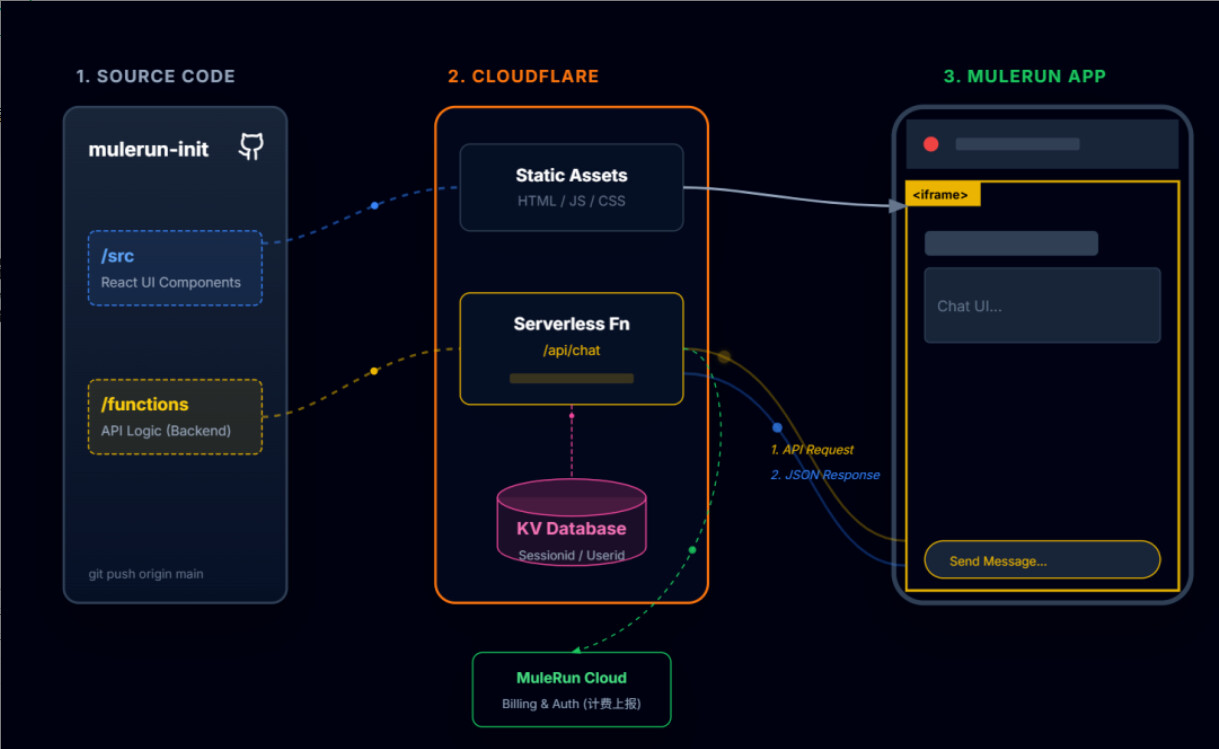
Core Functional Modules
1. Session Validation & Nonce Replay Protection
When a user clicks on your Agent in MuleRun, the platform generates a signed URL containing a sessionId and signature parameters. You need to verify this signature to ensure the request comes from a legitimate user.
Why Cloudflare Workers KV?
Workers KV is a globally distributed key-value store, perfect for storing session data and nonces:
- Ultra-low latency: Hot key read latency is typically 500μs - 10ms.
- Auto-replication: Data is automatically replicated to all nodes globally for high availability.
- Generous free tier: 1,000 write operations and 100,000 read operations per day.
2. Unified AI API Proxy
MuleRun provides a unified AI API compatible with the OpenAI format, supporting multiple models like ChatGPT, Gemini, and Anthropic Claude.
Advantages of the API Proxy:
- Hidden Keys: API Keys are stored in server-side environment variables, inaccessible to the frontend.
- Unified Error Handling: Centralized handling of API errors and retry logic.
- Auto-metering: Automatically reports costs after every API call.
3. Metering Reporting System
MuleRun provides a flexible metering API that supports idempotency to prevent double-charging.
Billing Model Choice:
The project uses a Custom Metering mode, dynamically billing based on actual API call costs, with a profit margin controlled by the PRICING_MARKUP_MULTIPLIER environment variable.
4. React Shell & iframe Applications
The project uses a Shell + iframe dual-layer structure:
Shell Application (src/App.tsx):
- Displays session info (user, remaining credits, etc.)
- Embeds the iframe to load the actual Agent page
- Handles URL parameters and passes the sessionId to the iframe
iframe Application (apps/init/):
- Pure HTML/CSS/JavaScript, no framework dependencies
- Communicates with the shell via
postMessage - Calls Functions API to implement AI features
Why the iframe architecture?
- Style Isolation: CSS inside the iframe won’t pollute the outside, and vice versa.
- Independent Environment: Each Agent can use a different tech stack.
- Security Sandbox: Limits iframe permissions via the
sandboxattribute. - Reusability: The same shell can load multiple different iframe applications.
Developer Experience: From Zero to Launch in 5 Steps
Step 1: Clone Project and Install Dependencies
git clone https://github.com/aichimp/mulerun-init.git
cd mulerun-init
npm install
Step 2: Configure Environment Variables
cp .dev.vars.example .dev.vars
Edit .dev.vars:
AGENT_KEY=your_mulerun_agent_key
MULERUN_API_KEY=your_mulerun_api_key
MULERUN_API_BASE=https://api.mulerun.com
PRICING_MARKUP_MULTIPLIER=1.5  # Add 50% profit on top of cost
SESSION_ALLOWED_ORIGINS=mulerun.com,localhost
You can obtain these keys after creating an Agent in the MuleRun Creator Studio.
Step 3: Create Cloudflare KV Namespace
npx wrangler login
npx wrangler kv namespace create NONCE_KV_INIT
npx wrangler kv namespace create NONCE_KV_INIT --preview
Fill the returned namespace ID into wrangler.toml.
Step 4: Local Development & Testing
npm run build
npm run dev
This starts two services:
- Vite Dev Server (http://localhost:5173) - Frontend Shell
- Wrangler Pages Server (http://localhost:5173) - Backend Functions
Open http://localhost:5173/apps/init/index.html in your browser to see the Agent page.
Step 5: Deploy to Production
npm run build
npm run pages:deploy
Wrangler will automatically deploy the project to Cloudflare Pages and return a .pages.dev domain.
Configure this domain in the “Start Session URL” field in MuleRun Creator Studio, submit for review, and you’re ready to launch.
The whole process takes less than 1 hour, with most time spent waiting for dependency installation and builds.
Cost Analysis: Can it Really Run for Zero Cost?
Let’s do the math to see how many users the Cloudflare Free Tier can support.
Cloudflare Pages Free Limits
| Resource | Free Limit | Price if Exceeded |
|---|---|---|
| Deployments | 500 / month | N/A (Hard Limit) |
| Concurrent Builds | 1 | N/A |
| Functions Requests | 100,000 / day | $0.50 / million |
| Functions Duration | 10ms CPU / request | $0.02 / million CPU-ms |
| Workers KV Storage | 1 GB | $0.50 / GB / month |
| Workers KV Reads | 100,000 / day | $0.50 / million |
| Workers KV Writes | 1,000 / day | $5.00 / million |
Cost Per Session
Assuming a typical AI chat Agent session:
1. Session Validation: 1 Function request + 1 KV write
2. 10 Dialogue Turns: 10 Function requests + 10 API calls
3. 10 Metering Reports: 10 Function requests
4. Session End: 1 Function request

Total:
- Functions Requests: 22
- KV Writes: 2
- KV Reads: 0 (nonce doesn't require reading)
Sessions Supported by Free Tier:
Daily Functions Limit: 100,000
Consumption per session: 22
Daily supportable sessions: 100,000 / 22 ≈ 4,500

Daily KV Write Limit: 1,000
Consumption per session: 2
Daily supportable sessions: 500

Bottleneck is KV writes: Actual limit is 500 sessions/day
Conclusion: Under completely free conditions, your Agent can support 500 sessions per day, which is equivalent to 15,000 active users per month (assuming each user averages 1 use per month).
For the vast majority of individual developers and startup projects, this scale is more than enough. When your user base breaks this threshold, it means your Agent is generating stable revenue, making a paid upgrade reasonable.
Best Practices Summary
Based on recent practical experience, I’ve summarized the following best practices:
Development Phase
- Validate logic in local mode first: Set
SESSION_VALIDATION_DISABLED=trueto skip signature verification and focus on feature development. - Use TypeScript: Type checking can avoid 90% of low-level errors.
- Modularize API calls: Encapsulate AI API calls into independent functions for easy testing and reuse.
- Version your iframe apps: Use git tags to manage different versions for easy rollbacks.
Deployment Phase
- Manage keys with Environment Variables: Never hardcode API Keys in the code.
- Configure Cloudflare Pages Environment Variables: Separate configuration for production and preview environments.
- Enable Cloudflare Analytics: Monitor Functions call volume and error rates.
- Configure a Custom Domain:
.pages.devdomains can be unstable in some regions; binding your own domain is more reliable.
Operations Phase
- Monitor Metering: Regularly check MuleRun’s Metering API to ensure no missed or duplicate reports.
- Introduce Caching Gradually: Optimize costs only after user volume increases; premature optimization is the root of all evil.
Future Outlook: Opportunities in the AI Agent Ecosystem
MuleRun and the iframe Agent specification are just the starting point. The AI Agent ecosystem has massive room for imagination.
Trend 1: Vertical Industry Agents
While general Agents (like ChatGPT) are powerful, specialized Agents in vertical fields have more commercial value. For example:
- Medical Agents: Diagnostic assistance, drug queries
- Legal Agents: Contract review, legal consultation
- Financial Agents: Investment analysis, risk assessment
These Agents require domain knowledge and specialized data, and profit margins can be 3-5 times higher.
Trend 2: From Pay-per-use to Outcome-based Pricing
Currently, most Agents charge by usage (tokens, API calls, etc.), but users really care about results. For example:
- Sales Agent: Charge per closed order
- Customer Service Agent: Charge per resolved issue
- Content Agent: Charge per high-quality article generated
This model requires higher technical standards (accurately assessing result quality) but reflects value better and is worth long-term exploration.
Final Thoughts
As an independent developer, I know that time is money. In the past, building an AI project might have taken 2-3 months to see the first dollar; now, with the combination of MuleRun + Cloudflare, you can launch in 1 day and start earning within 1 week.
This isn’t magic; it’s standing on the shoulders of giants—leveraging mature platforms and infrastructure to focus on what you do best. MuleRun provides the distribution channel and payment system, Cloudflare provides global computing and storage, and you only need to provide the creativity and business logic.
This is the right way for AI developers to work in 2025: Don’t reinvent the wheel. Be good at combining existing resources, validating ideas quickly, and iterating based on data.
- If you also want to be a gold digger in the AI wave and turn creativity and skills into revenue,
- Welcome to apply to become a MuleRun Creator!
- MuleRun offers a very generous support plan to help you ride the wind and monetize globally!
- Apply Now: 📝 MuleRun Genesis Creator Program Application
Happy coding, and happy earning! 