Hello Mulerun team,
I am trying to implement a Human-in-the-Loop (HITL) workflow where the Agent pauses during execution to output content for user confirmation before proceeding.
In local n8n, this is easily achieved using the “Response to Chat” node. However, your documentation mentions that currently only the “Form” node is supported. I have attempted the following workarounds to display Agent data within that form:
-
Form Description: Referencing the Agent’s output variable in the description field.
-
Custom HTML Element Type: Attempting to reference the output within a custom HTML block.
-
Form Field Name: Referencing the output variable directly in the field name.
The Issues:
-
Regarding 1 & 2: When running the Agent on Mulerun, these elements do not display at all; only the “Test Element Type” field is visible.
-
Regarding 3: When running on Mulerun, the UI displays the raw variable name (e.g.,
{{$node.task.json.output}}) instead of the actual resolved value.
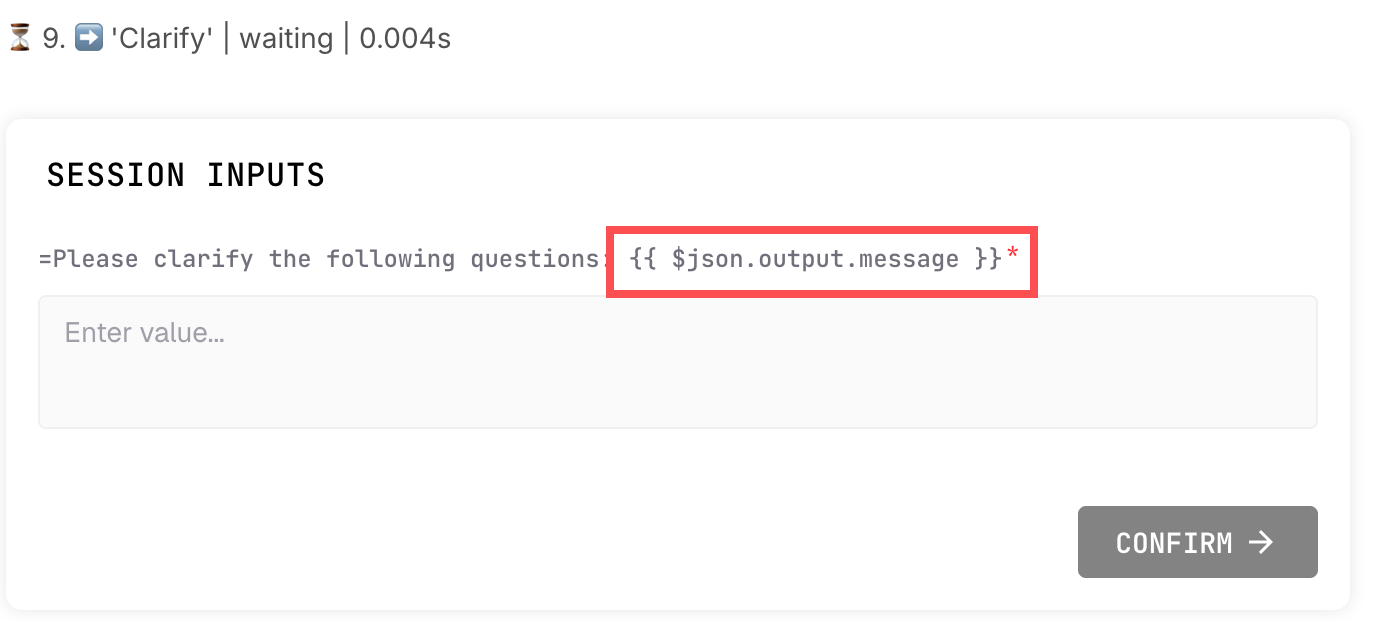
All of these methods work perfectly in my local n8n environment. Could you please clarify how to properly pass specific information from an active Agent execution to the user during an HITL step on your platform?